Need Basic Tech Help? Tech-Talk Has You Covered

Tech-Talk.com is an online resource available to patrons of the East Greenbush Community Library. This resource comes in several formats.

  • A website full of articles and videos to help you learn what you need to know to be successful with everyday technology
  • An app to help you get the above resources on-the-go
  • A weekly newsletter containing a quick technology tip
  • Access to live webinars that end up as videos on the website
  • The opportunity to request an article or webinar on a topic of your choosing

The Website

There is so much information on the website that finding what you need can be a bit overwhelming if you’re not sure what you’re looking for. Luckily, Tech-Talk has grouped the information in several different ways to help make it easier to browse.

The page we’re highlighting today is Basics for Non-Techies. If you are a novice user looking for basic information about working with email, documents, and the internet, this is the page for you. Even if you aren’t a novice user, you may find something on this page that would be useful to you.

Join us next time, when we highlight other pages that help you browse and find quick solutions.

Do You Use Tech-Talk?

If you have tried Tech-Talk, let us know what you think! Did they have the answers you were looking for?

Have Your Passwords Been Compromised?

These days, security breaches are in the news so often you may think there is no way to avoid having your information stolen. While no credentials are fully safe from hacking, using good password hygiene (not reusing passwords, using complex passwords, etc.) and staying on top of which of your accounts has been hacked can go a long way in keeping you safe.

Even if you watch or read news 24/7, it is impossible to keep up with all of the account breaches yourself. Luckily, https://haveibeenpwned.com/ exists to keep track of this for you.

The process is simple and free. Point your internet browser to https://haveibeenpwned.com/ and enter your email address.

When I put my personal email in, I got this message:

If I scroll down a bit, I can see the individual instances in which my information was compromised, along with more information about each particular hack:

What Do I Do with This Information?

Just because you have an account with a service that was breached doesn’t mean someone is actively using your account. It just means your information may be in the wrong hands. Knowing which accounts have been compromised can help you in the following ways:

  • Quickly change passwords and/or associated email addresses to prevent someone taking over your account. Also change credentials for any other account that uses the same email/password combination.
  • Get a heads up to check and make sure no unauthorized activity has happened on your compromised account.
  • Evaluate whether this is a service/account you really need. If not, delete your account, if possible.
  • Discover services you forgot you had signed up for!

Try It Out

Now it’s your turn to see if any of your email addresses have been pwned. If they have, there is no need to panic. Just follow the steps above to re-secure your accounts.

Read New York Times Articles Online for Free!

Thanks to NOVELNY, all New York State residents now have access to full-text New York Times articles online. Residents can even get today’s articles! Unfortunately, images and the original newspaper layout are not included in the article view.

How do I find today’s articles?

You can get to the New York Times search page directly, or you can find the link with our other digital resources at https://eglibrary.org/digital.

Click on the “advanced search” link just below the box. The next page is full of possible search filters, but we are going skip down to the “search limiters” section to the date area.

By default, the date is set to all dates. Click the “on” button to enter a specific date. Note that the first field is for the day and the second is for the month.

Scroll to the bottom of the page and select “search.”

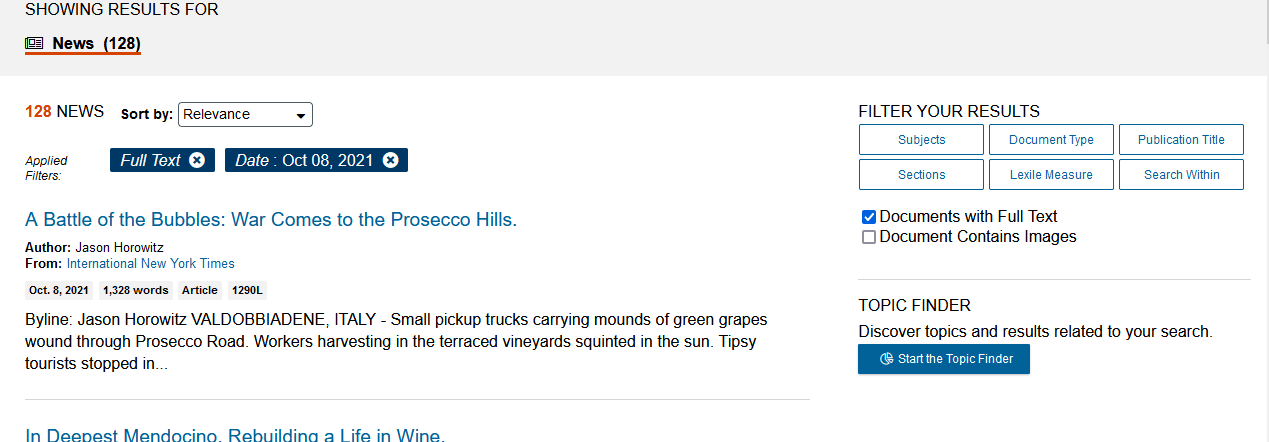
On the results page, you can scroll down to browse articles or apply the filters shown on the right to refine your results:

Click on the title of an article to read it.

Try it today and let us know what you think in the comments!

New Resource: Black Life in America

For the last few weeks, we have been highlighting collections included in the library’s Newsbank subscription. This week’s spotlight is on Black Life in America, a collection of articles that highlights the history of African Americans in the United States as recorded by the news media.

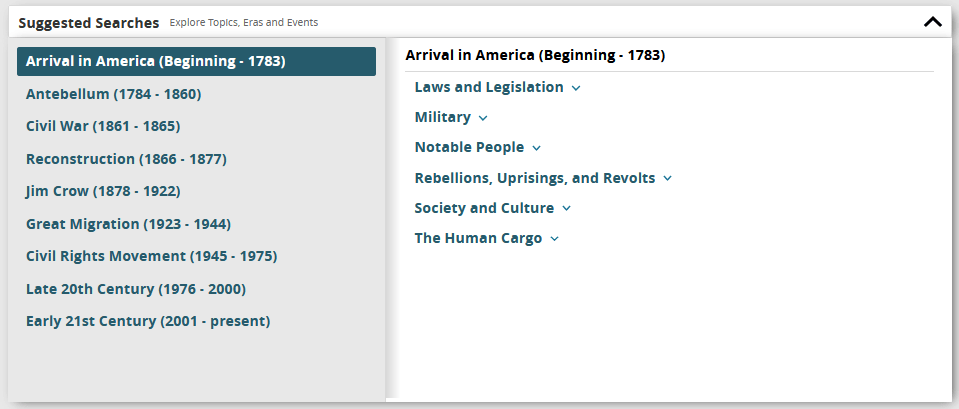
As with most online resources, a keyword search is available if you already know what you’re looking for. If you are just exploring, try one of the suggested searches below the search box:

If you are on a device connected to the library’s network, clicking the link above will take you directly to the unlocked website. If you are not in the library, you will be prompted for your library barcode number. Enter the whole number with no spaces. If your card is rejected, there could be a few reasons:

  • There is a space somewhere in the number entered. Solution: try entering the number again.
  • Your library card has expired. Solution: contact us to renew your card.
  • Your library card is no longer in good standing (too many fines/fees/overdue items). Solution: login to your account and pay any fines/fees accrued. Then try again.
  • You are not a resident of East Greenbush/Schodack. Solution: contact the library where you pay taxes and request Consumer Reports access.
  • You are a resident, but to do not have a resident card. Solution: contact us to prove residency and we will issue a new resident card at no charge.

Got questions? Want to let us know what you think of the service? Please let us know in the comments.

Heritage Hub: A Companion to Ancestry

If you’re interested in genealogy, you may already be aware that you have access to Ancestry through the library and have visited other resources on our genealogy page. Now there is a new resource available to East Greenbush/Schodack cardholders called Heritage Hub. This collection contains obituaries in the U.S. going back to 1704 to help you trace your family lines.

If you are on a device connected to the library’s network, clicking the link above will take you directly to the unlocked website. If you are not in the library, you will be prompted for your library barcode number. Enter the whole number with no spaces. If your card is rejected, there could be a few reasons:

  • There is a space somewhere in the number entered. Solution: try entering the number again.
  • Your library card has expired. Solution: contact us to renew your card.
  • Your library card is no longer in good standing (too many fines/fees/overdue items). Solution: login to your account and pay any fines/fees accrued. Then try again.
  • You are not a resident of East Greenbush/Schodack. Solution: contact the library where you pay taxes and request Consumer Reports access.
  • You are a resident, but to do not have a resident card. Solution: contact us to prove residency and we will issue a new resident card at no charge.

Got questions? Want to let us know what you think of the service? Please let us know in the comments.