Email Scams Part 2 – 4 Ways to Protect Your Computer and Files

In an earlier post, we highlighted a Tech-Talk article with tips for identifying scam emails. Beyond being careful about clicking a link in a questionable email, there are some things you can do right now to protect your computer from becoming compromised in the event a scam evades detection.

One thing you can do is to make sure your device’s operating system and its apps/software are up-to-date. This means actions like performing Windows Updates when prompted or checking the app store to make sure your apps are all updated to the latest version.

For more tips on securing your computer and files from scams, check out this Tech-Talk article and video. If you have questions about how to use any of these tips, please let us know in the comments or contact the Reference Desk at the library, 518-477-7476, option 5.

Dump the Literal Approach to Images

Images do a great job of helping written ideas to be understood. Often, writers search for an image that literally depicts they subject they are discussing. However, an image that directly shows your subject may not be as engaging as one that simply reinforces the idea of what you are writing about.

To learn more, check out this Tech-Talk article about thinking outside the box when choosing images to pair with written content. If you are prompted for a username and password, both are eglibrary.

Read New York Times Articles Online for Free!

Thanks to NOVELNY, all New York State residents now have access to full-text New York Times articles online. Residents can even get today’s articles! Unfortunately, images and the original newspaper layout are not included in the article view.

How do I find today’s articles?

You can get to the New York Times search page directly, or you can find the link with our other digital resources at https://eglibrary.org/digital.

Click on the “advanced search” link just below the box. The next page is full of possible search filters, but we are going skip down to the “search limiters” section to the date area.

By default, the date is set to all dates. Click the “on” button to enter a specific date. Note that the first field is for the day and the second is for the month.

Scroll to the bottom of the page and select “search.”

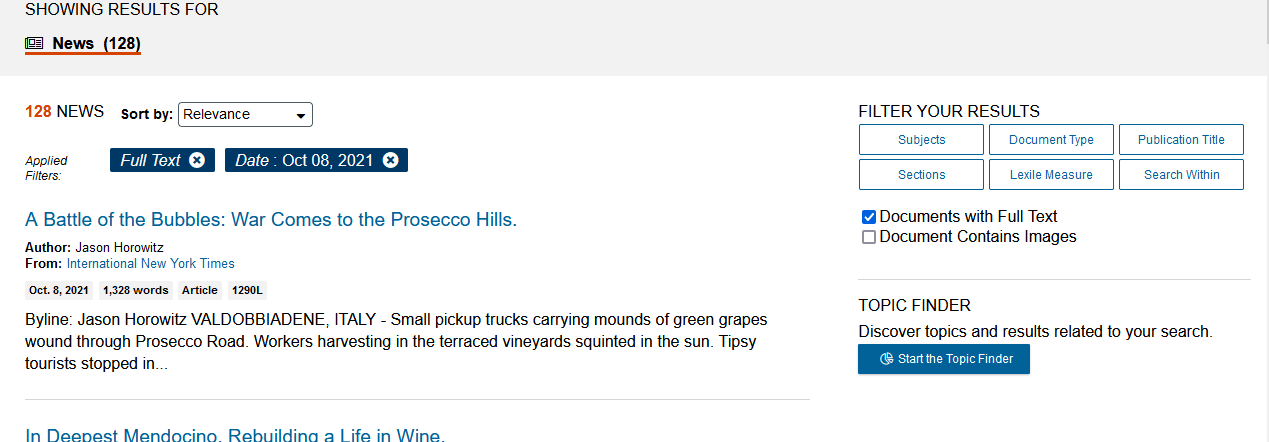
On the results page, you can scroll down to browse articles or apply the filters shown on the right to refine your results:

Click on the title of an article to read it.

Try it today and let us know what you think in the comments!

How to Write Like a Professional

Wishing you could up your writing game, but you’re not sure where to turn? The folks at Tech-Talk have you covered with this webinar about professional writing.

Learn several “tricks” to ensure your writing is top-notch. Discover what professional editors know that ramps up text to a much higher level. No matter what you’re writing (instructions, reports, email) these techniques will have others impressed with the quality of your prose.

Detecting Email Scams

Have you ever received an email you thought might be dodgy, but couldn’t tell for sure? Given the prevalence of email scams, your instinct is likely correct. But what if that email from your bank is real and requires a response?

The folks at Tech-Talk have written a great article to teach you how to scan the email for clues that it might be a scam. Even if an email passes scrutiny, you may still want to avoid clicking links in the email. If it is from an entity with which you have an account, try typing the site’s known login address into your browser rather than clicking a link.